
















V50 DSC VHF Radio / with integrated AIS Receiver


The V50 VHF radio for dual-channel communication with AIS reception and VHF via a single antenna. The unique "TrackYourBuddy" function shows the position of up to three buddies. Product details
This product is no longer available. But a successive product is available:
Available variants

SVB recommends


Product details


B&G V50 VHF Radio
with integrated AIS receiver and DSC controller

Communicate clearly with the reliable B&G V50 VHF radio. The internal AIS receiver can output the incoming AIS data to a wide variety of devices using the integrated NMEA0183 or NMEA2000 interface.
Dual-channel VHF
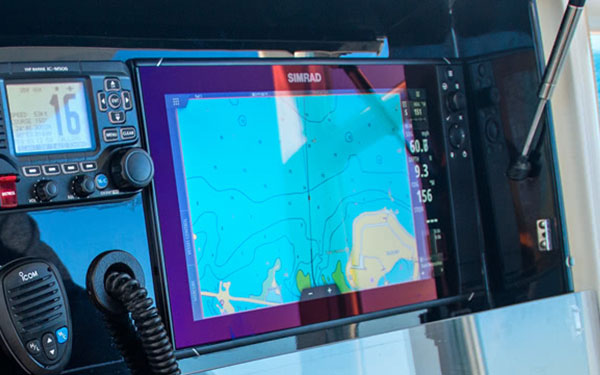
The V50 VHF radio for dual-channel communication with AIS reception and VHF via a single antenna. The unique "TrackYourBuddy" function shows the position of up to three buddies. Use AIS with B&G Zeus chartplotters for a fully integrated navigation and security system.
Whether it's a handheld system for using a thumb to "push to talk" or a built-in VHF system with dedicated channel buttons, the menus are always easy-to-use and intuitive. All B&G VHF maritime radio systems have an emergency switch for situations at sea when distress calls need to be made. Thanks to Digital Selective Calling, every B&G system can send an automatic distress signal.
Main functions
- Firmly mounted DSC VHF
- Built-in AIS receiver
- NMEA0183 input (4,800 baud for GPS data RMC, GGA, GLL, GNS)
- NMEA0183 output (38,400 baud for DSC and AIS data sets)
- Powerful internal speaker / PA
- External speaker connection (power: 2W for 4 Ohm speakers / 4W for 2 Ohm speakers)
- Dual and TriWatch modes
- MOB
- TrackYourBuddy function
- AIS plot, waypoints, navigation and MOB
- Waterproof according to IPX7
- Can be immediately integrated into marine network
- 6 buttons for easy rudder operation
- Mounting kit & sun cover included as standard
- Added value with built-in AIS receiver - one antenna required
- User-friendly - large display with plenty of information, tested rotary switches
Note - Error in installation instructions on page 17
Technical specifications
| Frequency range: send | 156.025 to 157.425 MHz |
| Frequency range: receive | 156.025 to 163.275 MHz |
| Operating temperature | -20 ° C to +55 ° C |
| Operating voltage | 12V DC on-board voltage |
| Power consumption when receiving | Max. <1.5A (max.3.5A with hailer function) |
| Power consumption when sending | <6A at high transmission power (at 13.6V voltage) / <1.5A at low transmission power (at 13.6V voltage) |
| NMEA0183 interface (input) | 4,800 baud for GPS data sets RMC, GGA, GLL, GNS |
| NMEA0183 interface (output) | 38,400 baud for DSC and AIS datasets |
| NMEA2000 interface | Micro-C (5-pin connector) |
| Output power for external hailer | 30W at 4 ohms |
| Digital Selective Calling (DSC): Receiving | Class D |
| AIS receiver | Integrated, 2 channels |
| Dimensions | 180.5 x 96.3 x 171.0 mm |
| Weight | 1.63 kg |
| LCD display | 128 x 256 pixels / 1.3 x 2.6 " |
Note
The DSC or ATIS function / menu is only available in the respective channel group. Please change to the corresponding channel group to use the respective functions.
Programming notes
This device has to be programmed with your personal data, such as: MMSI and/or ATIS numbers.You can program the MMSI and ATIS number yourself. The corresponding procedure can be found in the manual.
Alternatively, we can programme the device for you. For this we charge a programming fee.
If we would like us to programme the device, please enter your MMSI / ATIS number in the 'comment' field while ordering or fill out our datasheet for programming VHF radios and send it to: [email protected].
If additional channels (e.g. Dutch channels 30, 31 and 37) are to be activated, we calculate our programming fee . The flat rate is only charged once per device.
The application for MMSI and ATIS numbers can be found under Service/Downloads.
Documents


Product safety


Customers ask customers
Technical question
Rokas A.
| Aug 7, 2020

My brand new unit has arrived, but when I press PTT button, no signal is transmitted, and no TX icon appears on the screen. I click 'scan' button, and then hit PTT button, which should stop the channel scan, but it doesnt. Is my PTT button dead on arrival?
Answer
Jaume C.
| Aug 10, 2020
I guess it is DOA, mine worked fine at first.
Technical question
Hannu H.
| Feb 3, 2020
Can I connect this to my Raymarine eS Series Chart Plotter? It would show the AIS targets on my Raymarine screen?
Answer from SVB customer service
Arne C.
| Feb 3, 2020

Hi Hannu, Yes that's correct. Ideally you connect both over the NMEA2000 Network
Technical question
Luka K.
| Jan 16, 2020

Does the VHF unit B&G V50 (that is on offer right now ) come with updated software (ie latest software upgrade, V.2.91 from 6/2017 or at least V2.87)? Thank you.
Answer from SVB customer service
Arne C.
| Jan 16, 2020
Hi Luka, the latest Firmware 2.91 should already on all devices be installed. Should this not be the case, unexpectedly, because from an older charge from the manufacturer, the device can be updated by the user himself using a B&G or Simrad plotter. The how to is described accordingly on the manufacturer's website

Customers also bought

Leak and Emergency Plug Set
only
€8.50
> 100
NMEA2000
T-Piece / Micro-C
only
€21.95
> 100
NMEA2000
Network Cable / Micro-C
from
€31.95
6 variants
NMEA2000
Starter Kit / Micro-C
only
€133.95
> 100
-7%
RAYMARINE
Adapter Cable SeaTalk NG to NMEA 2000 / female
€53.55
only
€49.95
90
PL Connector for RG8X and RG58 Cable
only
€2.95
> 100
Similar items
Program online

-10%
ICOM
IC-M330GE VHF DSC Marine Radio
€323.13
only
€289.95
28
Program online
-13%
ICOM
DSC and ATIS Radio System IC-M423GE / integr. GPS
€448.43
only
€389.95
6
-14%
ICOM
VHF Marine Bundle IC-M423 & Handheld Radio IC-M25 / black
€664.45
only
€569.95
6
-14%
ICOM
VHF Marine Bundle IC-M423 & Handheld Radio IC-M25 / blue
€664.45
only
€569.95
6
Program online
ICOM
IC-M510E EVO VHF Marine Radio with integrated GPS receiver
only
€779.95
2
Program online
ICOM
IC-M510E EVO VHF Marine Radio with integrated AIS receiver
only
€839.95
2
Program online
-13%
ICOM
IC-M605EURO VHF Marine Transceiver / with AIS and GNSS Receiver
€1,270.72
only
€1,099.95
2
Program online
STANDARD HORIZON
GX1400G VHF Marine Radio
only
€221.95
13
Program online
-10%
STANDARD HORIZON
GX2400E GPS VHF Marine Radio
€568.21
only
€513.95
Program online
-19%
RAYMARINE
Ray53 VHF Maritime Radio / integr. GPS receiver
€493.85
only
€399.95
30
Last seen products
VETUS
Watertank Inspection Kit
only
€45.50
33
-60%
Grounding Plate, Square / 300 x 80 x 13 mm
€427.98
only
€169.95
7
-15%
HELLA MARINE
LED Strip Light / warm white / red
€117.57
only
€99.95
13
NMEA2000 to WiFi Converter / W2K-1
-20%
SEATEC
LED Reading Light with Dimmer & USB-C / white / warm white/red
€78.94
only
€62.95
50
LEWMAR
OCEAN 10 Hatch / 324 x 324 mm
only
€711.95
1
CAN PLASTIC
Connection Accessories for Horizontally Mounted Sewage Tanks
only
€34.95
19
-11%
KUS
Voltmeter 8-16 V / 52 mm
€33.82
only
€29.95
30
E-mail Newsletter
Product news, offers & new guide videos. Stay up to date!
WhatsApp
New: Get news from SVB straight to your phone!